
What is the SAP S/4HANA Migration Cockpit?
The SAP S/4HANA Migration Cockpit is a data migration tool designed specifically for SAP S/4HANA Cloud Public Edition and SAP S/4HANA (including SAP S/4HANA Cloud Private Edition). It is SAP’s default tool for moving data into S/4HANA.
The SAP Data Migration Cockpit, through its modern “Migrate Your Data” Fiori app, is an indispensable tool for organizations migrating to SAP S/4HANA. It simplifies a complex process by providing a guided, pre-configured framework that accelerates project timelines and improves data quality. However, its true value lies in its role as a key enabler and enforcer of the Clean Core architectural strategy. By mandating a standardized, disciplined approach to data migration, it helps organizations build a new system that is agile, scalable, and free from the technical debt of legacy customizations and data.
Key characteristics and purposes of the Migration Cockpit
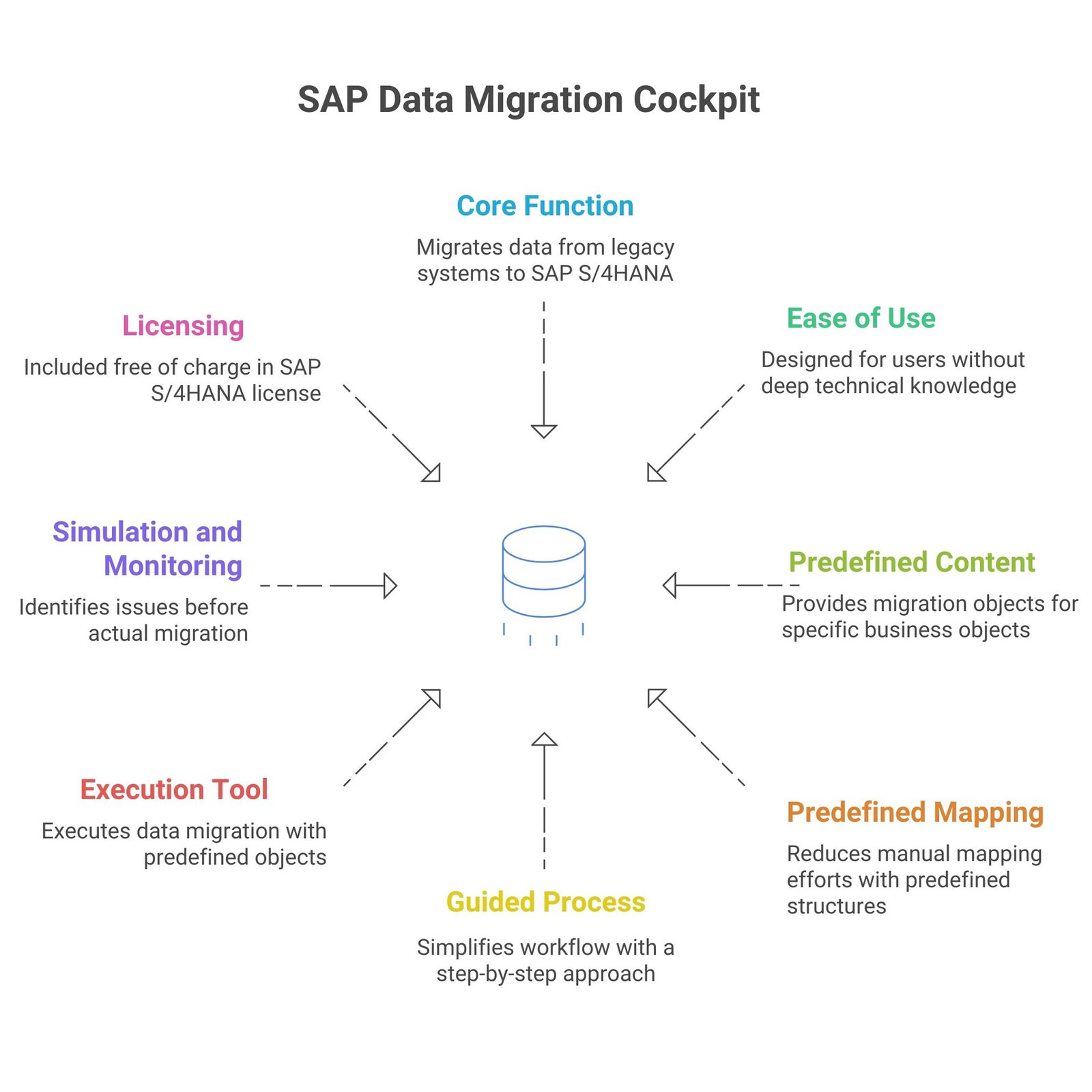
- Core Function: It is used to migrate master data and transactional data from legacy systems or external data sources into the SAP S/4HANA system.
- Ease of Use: It is designed to help customers migrate data without the need for programming or deep technical knowledge. The process is automated and features a user-friendly navigation.
- Predefined Content: SAP provides predefined migration objects (which are sets of instructions defining how to transfer data for a specific business object, e.g., customer or material master) that are selected and assigned to a migration project.
- Predefined Mapping: Sender structure, target structure, structure mapping, field mapping, field, and event rules are all predefined. This significantly reduces manual mapping efforts.
- Guided Process: It provides a guided, step-by-step approach to simplify the workflow.
- Execution Tool: Since the migration objects are predefined, the migration cockpit is considered a data migration execution tool.
- Simulation and Monitoring: All predefined data migration objects support simulation, which allows a test run against the target system to identify potential issues before the actual migration. Users can also monitor the data migration runs and analyze return messages.
- Licensing: The Migration Cockpit is included free of charge in the SAP S/4HANA license.
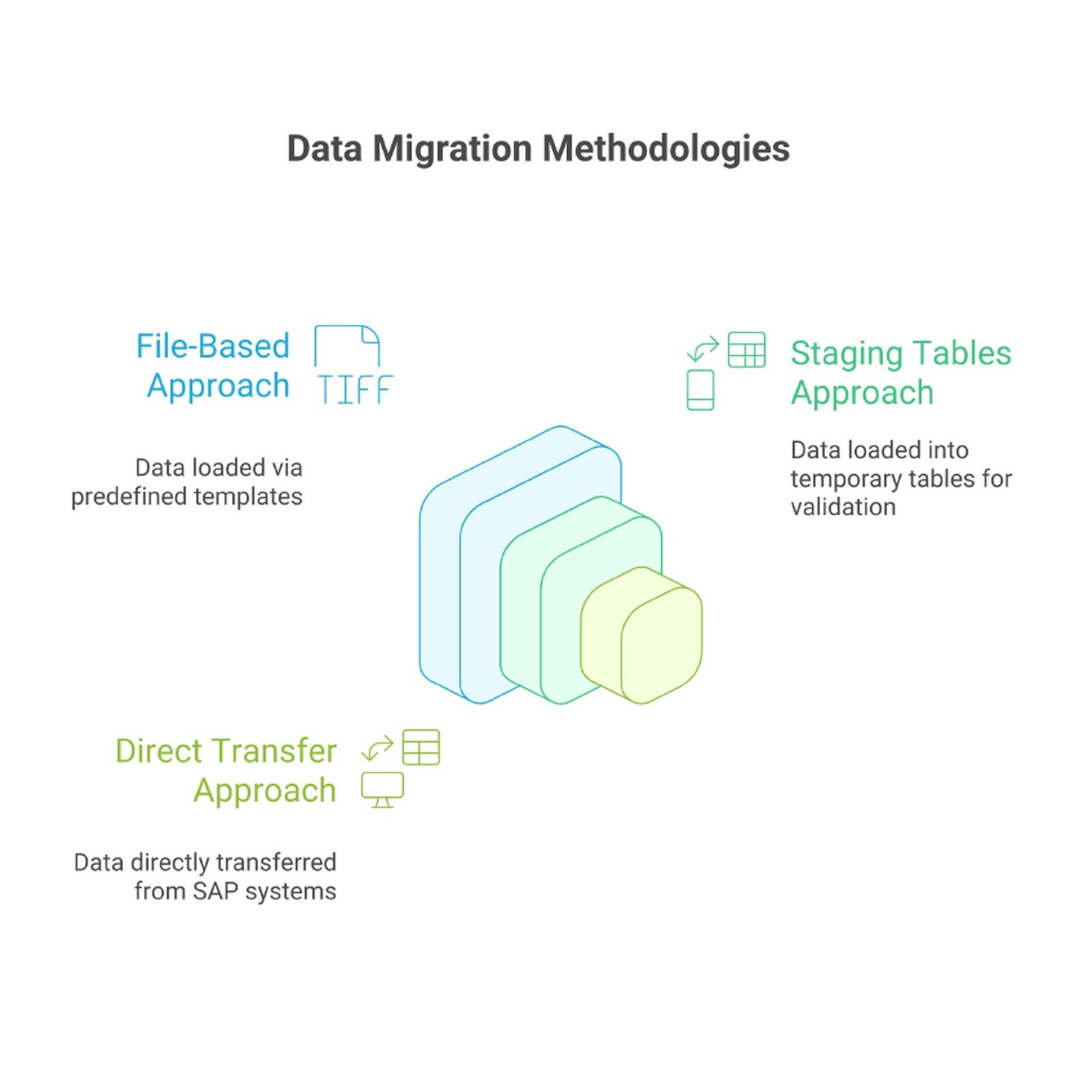
Data Migration Methodologies
The cockpit offers three distinct methods for loading data into the S/4HANA system, with a clear trend towards the more structured approaches.
The File-Based Approach: This method involves users downloading pre-defined templates, typically in CSV or XML format, for a chosen migration object. After populating the files with legacy data, they are uploaded directly into the cockpit, either as single files or as a zipped folder. This approach is relatively straightforward and suitable for smaller, less complex datasets. However, it has significant scalability limitations, including a file size limit (e.g., more than 60 megabytes), which can require splitting files and can be time-consuming. In a move to enforce better data governance, this method is being superseded by the staging tables approach in newer releases.
The Staging Tables Approach: This is the recommended method for handling large data volumes and complex projects. The cockpit automatically creates temporary database tables for each migration object. Data from legacy systems is first loaded into these staging tables, and then the cockpit transfers the data to the final S/4HANA production tables. This method is a key enabler of a robust data migration strategy, as it allows for meticulous data validation and transformation in a separate environment before the data ever touches the core S/4HANA system. External ETL (Extract, Transform, Load) tools from partners like Syniti can be used to extract, cleanse, and load data into these staging tables, providing a powerful and scalable solution for complex scenarios.
The Direct Transfer Approach: This approach simplifies the migration process for organizations moving from a compatible SAP source system (e.g., SAP ECC) to S/4HANA. The cockpit establishes a direct RFC (Remote Function Call) connection to the source system, allowing it to pull the data directly and convert it on-the-fly to the S/4HANA data model. This eliminates the need for intermediate files or staging environments, reducing complexity and potential points of failure.
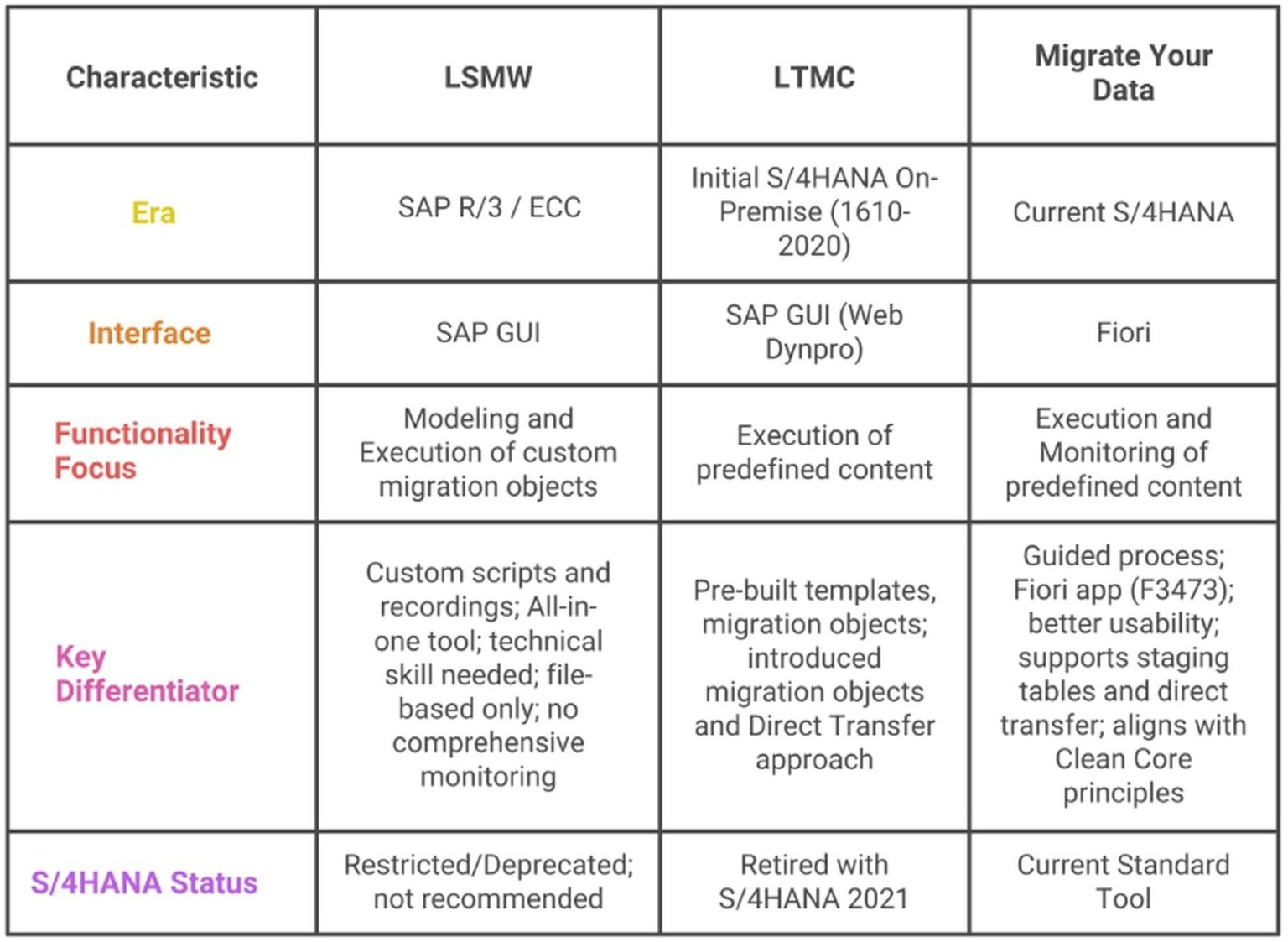
LSMW vs LTMC vs Migrate your data app (Fiori)
The comparison between LSMW, LTMC, and Migrate Your Data reflects the evolution of SAP’s primary tools for moving data, particularly in the context of migrating to SAP S/4HANA. While LSMW is a legacy tool, LTMC was its initial replacement, which has now been succeeded by the Fiori app Migrate Your Data (part of the SAP S/4HANA Migration Cockpit).
Using the Migrate Your Data App
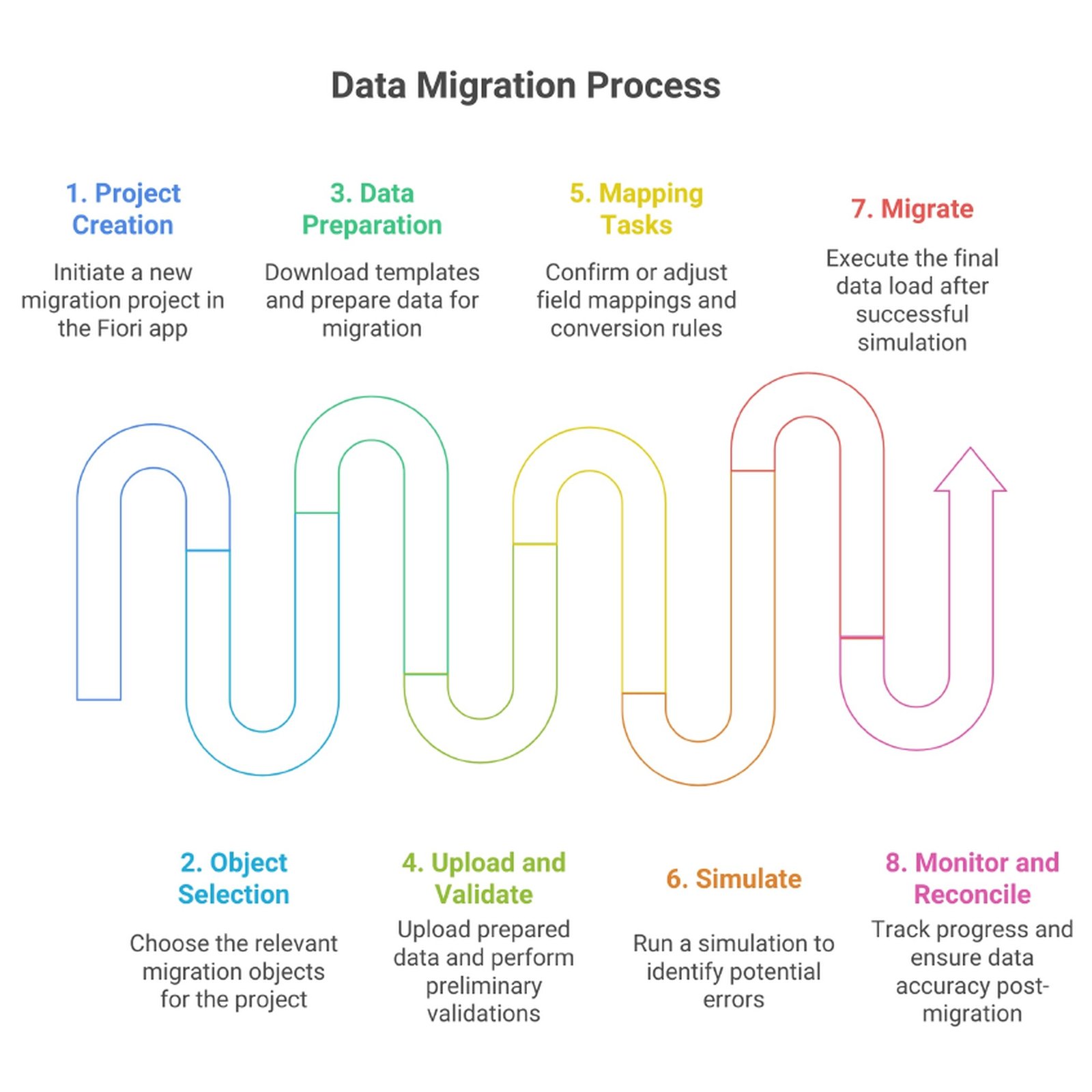
A typical migration project within the Migrate Your Data app follows a clear, structured sequence:
- Project Creation: A new migration project is initiated in the Fiori app, where a name and description are provided. The system only supports the creation of new projects in the development environment.
- Object Selection: The user selects the relevant migration objects (e.g., customers, vendors, materials) that are required for the project.
- Data Preparation: Templates for the selected objects are downloaded. This is the most critical and often the most time-consuming phase, as it requires meticulous data cleansing, validation, and harmonization in the source system or in an intermediate tool. The success of the migration is heavily dependent on the quality of this preparatory work.
- Upload and Validate: The prepared data is uploaded to the staging tables. The system automatically performs preliminary validations and mapping of the data to the correct structures if naming conventions are followed.
- Mapping Tasks: The user manually confirms or adjusts the field mappings and conversion rules. This step ensures that data fields from the legacy system are correctly aligned with the new S/4HANA data model, which often has a simplified structure.
- Simulate: A guided simulation is run to identify and flag potential errors before the final data load. This is a crucial step for error prevention.
- Migrate: Once the simulation is successful and any errors are resolved, the final data load is executed.
- Monitor and Reconcile: The Fiori app provides a monitoring screen to track the progress and status of the project. Post-migration, data reconciliation is performed to ensure all information was loaded completely and accurately.
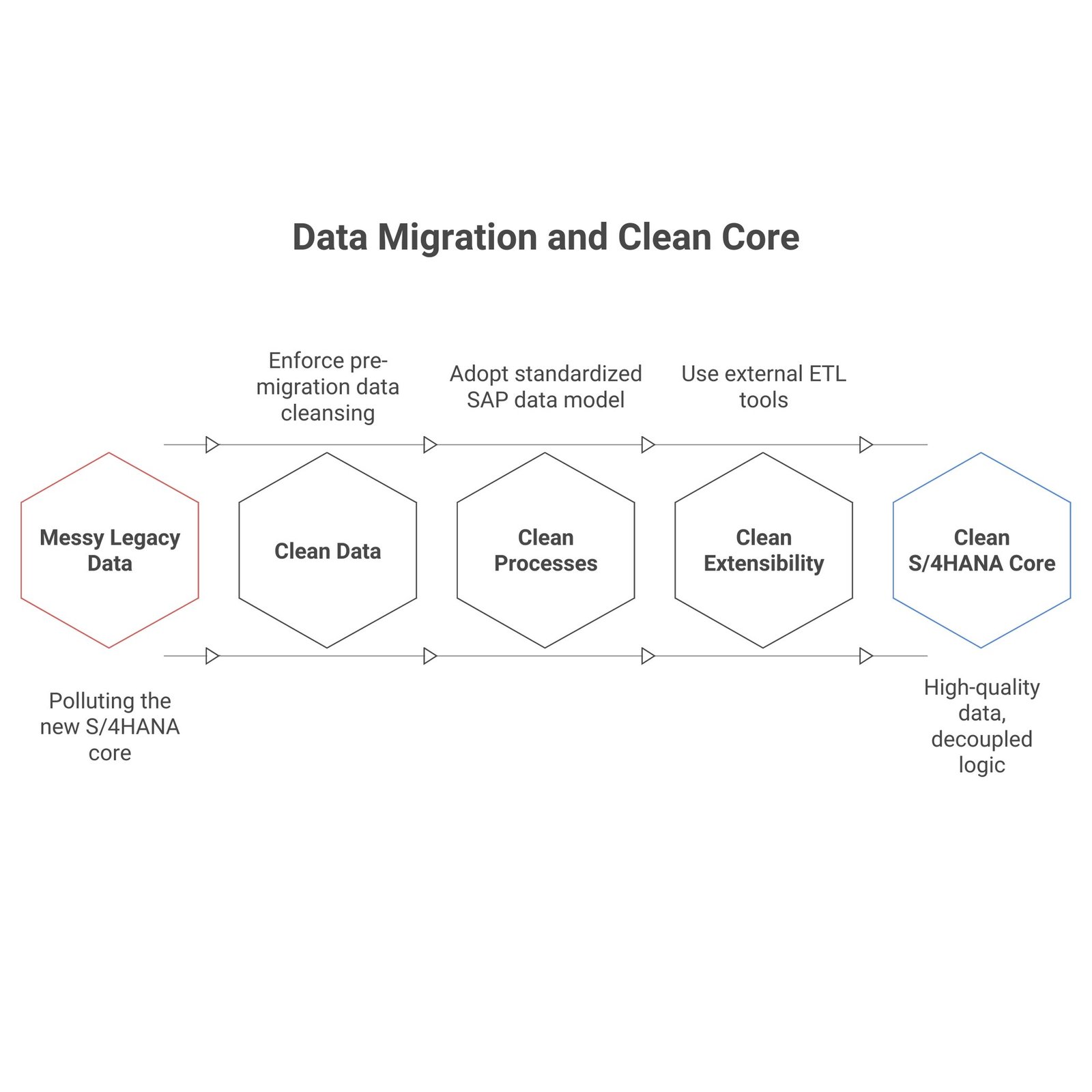
How the Migrate Your Data App enables Clean Core
The SAP Data Migration Cockpit, by its very design, is a powerful enforcer of the Clean Core philosophy.
Clean Data: The cockpit directly supports the “Clean Data” pillar by making pre-migration data cleansing and validation a non-negotiable prerequisite for a successful load. Its process, from downloading standardized templates to its strict validation rules, systematically prevents the messy, inconsistent, and outdated data of legacy systems from “polluting” the new S/4HANA core. This disciplined approach ensures that only necessary, high-quality data is migrated, leaving behind historical clutter.
Clean Processes: By relying on a standard, out-of-the-box tool with pre-built objects and a guided process, organizations are implicitly encouraged to adopt the standardized SAP data model and business processes. This is a strategic shift away from replicating legacy, often inefficient, workflows in the new system. The deprecation of LSMW, a tool that enabled a more customized, “as-is” migration, in favor of the more structured cockpit, underscores this architectural mandate.
Clean Extensibility: The cockpit’s limited capabilities for complex data transformation and enrichment are not a bug but a key feature of its Clean Core design. By not providing extensive transformation logic within the core, it implicitly steers organizations towards using external, side-by-side ETL tools where complex transformations are required. This design philosophy ensures that any complex custom logic remains decoupled from the S/4HANA core, preventing the accumulation of technical debt and upholding the principles of Clean Extensibility.
Sources
SAP S/4 HANA Data Migration Cockpit: Migrate Your Data App Guide
SAP S/4HANA Migration with Clean Core Principles
LSMW vs LTMC vs SAP DMC
Introduction to SAP Data Migration Cockpit – PART 1
Data Migration Demystified: Legacy System Migration Workbench vs. SAP S/4HANA Migration Cockpit
S4 Hana Migration Cockpit – File Approach Deep Dive